
AVR Arduino assembly coding
Its possible to intergrate assembly code in your C C program quite easy
Before we begin
In this tutorial we do only use 1 byte large variable - aka char or unsigned char
All registers are 8 bit (1 byte) registers so this is easier
So this is only first step…
just for now
Links
MixingCandassemblylanguageprograms.pdf ses usage of avr registers
step 1 - start Arduino IDE
Launch your Arduino IDE, select UNO ( or MEGA 2560) as your hardware
Open a new sketch with no code in it
Tight click the three dots near upper right corner
Click on New Tab ( or ctrl+shift+n)
Name it like myasm.S NB capital S is import
meaning assembly file
Name your whole sketch: File ->Save As -> myasm01 01 is short for the first
Connect an UNO or MEGA to your PC
step 2 - hello world
Some code - compile and test it - so we are in the game
 void setup() {
  Serial.begin(115200);
  Serial.println("Hello asm world");
}

void loop() {
}
Lets go assembly code
step 3 - call an assembly function from C
In the C file (ino file) we will call a function named test - test is coded in assembly
The function in C looks like
void test(void);
We must must declare it as an external function in our ino file. This means that the last process in making the program -linking - have to find it somewhere else.
test.ino
extern "C" {
  void test(void); // tell compiler it shall find test for us
}

void setup() {
  Serial.begin(115200);
  Serial.println("Hello asm world");

  test();  // call

  Serial.println("we came back - we did survive");
}

void loop() {
}
In the assembly file we just code it:
 ;Arduino sketch .S subroutine written in AVR assembly code

#include "avr/io.h"

; we tell the world we have something called test
.global test

 ; text is the segment where the code shall be
.text

 ; the funtion - we just RETurn from from the functin (ret command)
 ; test:  is a label or entry point
 test:
  ret  ; return from function

 ; datz all
step 4 - declare variable in assembly and C and use it in C and assembly land
C code - file surname is ino
extern "C" {
  void test(void); // tell compiler it shall find test for us
  extern volatile char xxx;  // xxx is declared in assembly land
}

void setup() {
  Serial.begin(115200);
  Serial.println("Hello asm world");

  test();  // call

  Serial.println("we came back - we did survive");

  xxx = 'a';  // letter a
  Serial.println(xxx);
}

void loop() {
}
assembly part
 ;Arduino sketch .S subroutine written in AVR assembly code

#include "avr/io.h"

; we tell the world we have something called test
.global test
.global xxx


;------ data -----
; data segment is our RAM /SRAM where variable lives

 .data
xxx: .BYTE 1


;-------code or text---------------
 ; text is the segment where the code shall be

.text

 ; the function entry point - we just RETurn from from the functin (ret command)
 test:
  ret   ; return from function
step 5 - increment the variable in Asm from an asm function - called increment
We will write a function in assembly land which incremt
a variable - xxx -in assembly land
a variable - yyy - which is in C land
extern "C" {
  void test(void);  // tell compiler it shall find test for us
  void increment(void);
  extern volatile char xxx;  // xxx is declared in assembly land
}

char yyy;  // in C a variable is public pr default

static char zzz;  // only accessable in this file

void setup() {
  Serial.begin(115200);
  Serial.println("Hello asm world");

  test();  // call

  Serial.println("we came back - we did survive");

  xxx = 'a';  // letter a
  yyy = 'A';
  Serial.println(xxx);
  Serial.println(yyy);
  increment();          // increment xxx by 1
  Serial.println(xxx);  // should b b
  Serial.println(yyy);
}

void loop() {
}
The assembly part
  ;Arduino sketch .S subroutine written in AVR assembly code

#include "avr/io.h"

; we tell the world we have something called test
; if you do not label them global they are secret outside of S file
.global test
.global increment
.global xxx


;------ data -----
; data segment is our RAM /SRAM where variable lives

 .data
xxx: .BYTE 1


;-------code or text---------------
 ; text is the segment where the code shall be

.text

 ;--------- test
 ; the function - we just RETurn from from the function (ret command)
 test:
  ret

;------ increment
increment:
push r16 ; so we dont destroy what may be in register 16

  lds r16,xxx ; load xxx in register 16 (8 bit register)
  inc r16     ; increment register
  sts xxx, r16  ; store register r16 to varable xxx

  ; now increment yyy in C land
  lds r16,yyy
  inc r16
  sts yyy,r16

; bad line below gives compiler error bq zzz is declared static in the c file == private
; so we cant see it
; lds r16, zzz


  pop r16 ; restore r16
  ret

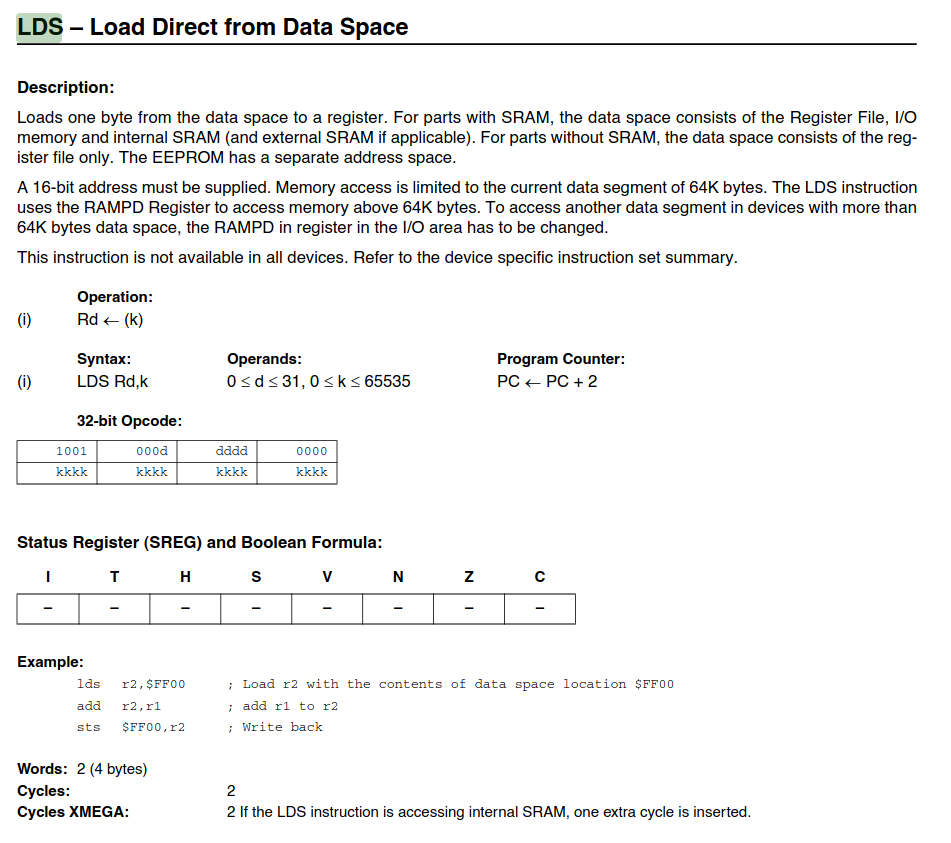
  ; lds see https://courses.cs.washington.edu/courses/csep567/10wi/resources/ATmegaInstructionSet.pdf page 93
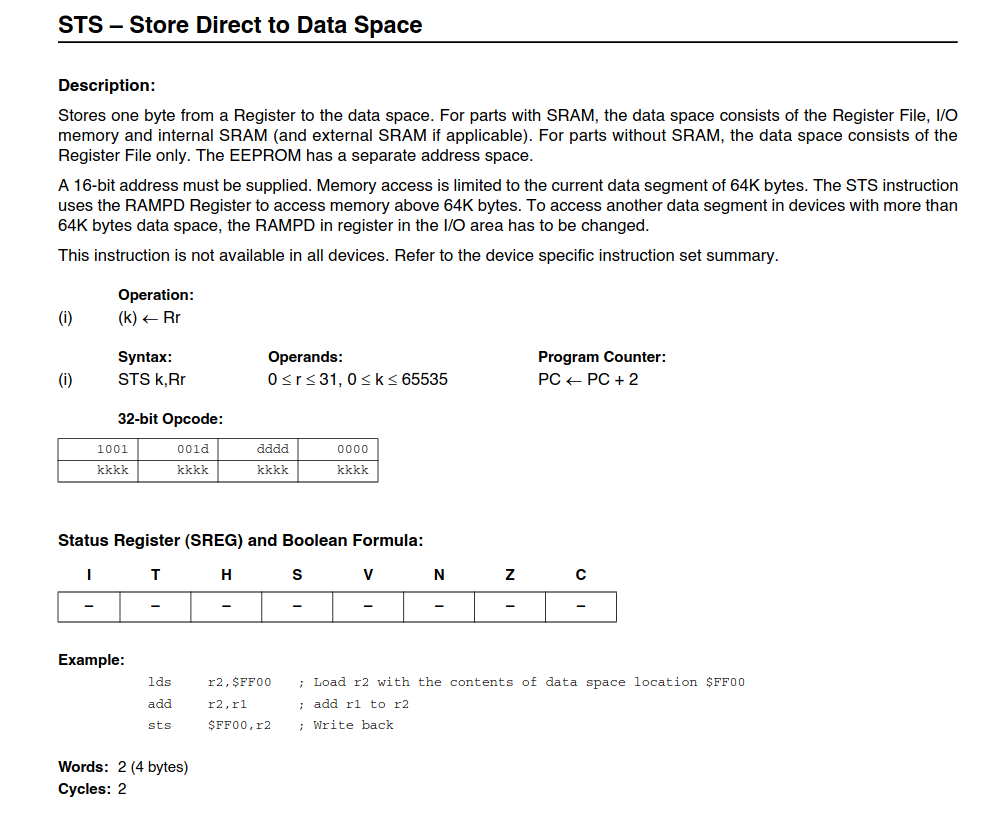
  ; sts see https://courses.cs.washington.edu/courses/csep567/10wi/resources/ATmegaInstructionSet.pdf page 147
The instructions lsd and store
notice that Register 0 to 31 can be used in lds and sts. Prerefable use r16 or higher
 |
 |
step 6 - blink led pin 13
ino
extern "C" {
  void led13on();
  void led13off();
  void set13out();
}


void setup() {
  set13out();
  //start();
}
void loop() {
   //forever();
  led13on();
  delay(200);
  led13off();
  delay(200);
}
asm
; Arduino sketch .S subroutine written in AVR assembly code

#include "avr/io.h"

.global led13on
.global led13off
.global set13out

set13out:
  sbi DDRB-0x20,5
  ret

led13on:
  sbi PORTB-0x20,5
  ret

led13off:
  cbi PORTB-0x20,5
  ret


; sbi see https://courses.cs.washington.edu/courses/csep567/10wi/resources/ATmegaInstructionSet.pdf page 120
; cbi see https://courses.cs.washington.edu/courses/csep567/10wi/resources/ATmegaInstructionSet.pdf page 48
step 7 - blink 13 vrs 2
Has slow and fast code - FYI
ino
extern "C" {
  void led13on();
  void led13onfast();
  void led13off();
  void led13offfast();
  void set13out();
  void set13outfast();
}


void setup() {
  set13out();
  //start();
}
void loop() {
  //forever();
  led13on();
  delay(200);
  led13off();
  delay(200);

  led13onfast();
  delay(200);
  led13offfast();
  delay(200);
}
assembly
; Arduino sketch .S subroutine written in AVR assembly code

#include "avr/io.h"

.global led13on
.global led13onfast

.global led13off
.global led13offfast

.global set13out
.global set13outfast

.text

set13outfast:
  sbi DDRB-0x20,5  ; do only set bit 5 - do not touch others
  ret

set13out:
  push r16
  ;sbi DDRB-0x20,5  ; do only set bit 5 - do not touch others
  ldi r16,  0b00100000
  out DDRB-0x20, r16      ; sets all 8 bite
  pop r16
  ret

led13onfast:
  sbi PORTB-0x20,5
  ret;

led13on:
  push r16
  in r16, PORTB-0x20
  ori r16,0b00100000  ; or immediate mask bit 5 high - rest untouched
  out PORTB- 0x20, r16
  pop r16
  ret


led13offfast:
  cbi PORTB-0x20,5  ; cbi : clear bit no 5
  ret

led13off:
   push r16
  in r16, PORTB-0x20
  andi r16,0b11011111
  out PORTB- 0x20, r16
  ;cbi PORTB-0x20,5
  pop r16
  ret

; ori see https://courses.cs.washington.edu/courses/csep567/10wi/resources/ATmegaInstructionSet.pdf page 107
; andi see https://courses.cs.washington.edu/courses/csep567/10wi/resources/ATmegaInstructionSet.pdf page 20
step 8 - from C call asm fct which calls a C function
ino
extern "C" {
  void asmfct();
  void cfct();
}

volatile int mark = 0;

void cfct() { // is called from asm world
  mark++;
}

void setup() {
  Serial.begin(115200);
  Serial.println(__FILE__);   Serial.println(__DATE__);   Serial.println(__TIME__);
  Serial.println("bef");
  Serial.print("mark ");
  Serial.println(mark);

  asmfct();
  Serial.println("after");
  Serial.print("mark ");
  Serial.println(mark);
}
void loop() {}
asm
; Arduino sketch .S subroutine written in AVR assembly code

#include "avr/io.h"

.text

 .extern cfct

.global asmfct

 asmfct:
   call cfct ;
   ret
As long as you retain this notice you can do whatever you want with this stuff on these pages.
If we meet some day, and you think this stuff is worth it, you can buy me a beer in return :-)
(C) Jens Dalsgaard Nielsen
credit for license this goes to phk@FreeBSD.ORG
