
Lesson 01 - introduction & Embedded Primer
The lecture
Tentative agenda.
Short intro to embedded system applied on Arduino
Refurbish of Arduino and C skills
Get Arduino IDE up and running
Get your Arduino up and running
Intro to Arduino and coding environment
Getting you all up and running on our Arduinos
If you dont have an Arduino either coop with person aside you or …
go to tinkercad , create a user, login and use the simulator
but realstuff on your table is the best way to go
Code structure in imperative coding
My first programs
blink
text
integer variables
ALL OF YOU CODING IN BETWEEN at classroom
Preparation for the lecture
-
I will recommend installing SW instead of using netbased solution simply because of potential wlan problems.
If you have an old version please upgrade or install to version 1.8.9
Test your installation by just compile and upload an empty programm
See the movies (See below)
Configure your editor so you will have line numbers displayed
Find out where your code files are stored on your harddisk
Hint look in preferences
It might not be strictly in the sequential order given above
We know some of you have coded before but we need ALL of you to be fluent in coding, so
if you you are fluent in coding HELP the persons around you.
You might end up in same project group and there you rely on all can code.
Exercises
-
get it up an running
Code (copycat) program in movie no 2
get it up and running
Code blinking SOS on led13
S: … O: — ( SOS: … — … … — … etc)
A dot last 200 msec (or whatever you like
A dash last 3 times a dot
time between dot and dashes is equal to dot length
time between letters is equal to one dash length
time between words is 7 equal to seven dots length
See also wikipedia interesting stuff is in botttom
Add printing so you print SOS at same time
Help people around you
Litterature
Primary
A comics about coding on Arduino
Very light and easy intro
Introduction to Arduino (Alan G. Smith)
chapter 1 - same as Evans just in another way - read it !
-
ch 1-4
You might also read:
Beginning C for Arduino Jack Purdum
Ch 1 -2 - pp 1-19, 20-35
Ch 1 easy reading, Ch 2 need to be read carefully - lots of examples inside
Arduino Programming Notebook (Evans)
pp 7-9 - introduction to code structure
HW:
You need
Arduino SW installed
An Arduino UNO/MEGA/… with a LED on pin13
Maybe … extra LEDs, a breadboard and a 500-1000 ohm resistors
a pushbutton
wires for the breadboard
Movies
After today - you should (at least) be able to …
Install Arduino IDE (Integrated Development Environment)
Write a small program
Compile and upload the program
NB: remember to select type of Arduino and USB port
Handling digital output (LED13)
Handling Serial Communication
UNDERSTAND setup and loop sequential execution
Tips
Morse an A (.-) again and again
In loop you may write
// dot
 digitalWrite(13,HIGH);
 delay(1000);
 digitalWrite(13,LOW);
 delay(1000);
// dash
 digitalWrite(13,HIGH);
 delay(3*1000);
 digitalWrite(13,LOW);
 delay(1000+2000);
For the interested :-)
=   : dot
=== : dash 3 times length of dot

.   : symbol space
         - 1 between symbols in letter
         - 3 between letters
         - 7 between word

−− −−− ·−· ··· ·       −·−· −−− −·· ·
M   O   R   S  E        C    O   D  E

         1         2         3         4         5         6         7         8
12345678901234567890123456789012345678901234567890123456789012345678901234567890123456789

M------   O----------   R------   S----   E       C----------   O----------   D------   E

===.===...===.===.===...=.===.=...=.=.=...=.......===.=.===.=...===.===.===...===.=.=...=
   ^   ^^^        ^^^   ^       ^          ^^^^^^^
   |    |          |    |                     |
   |  letter space |    dot                word space
   |              dash
symbol space
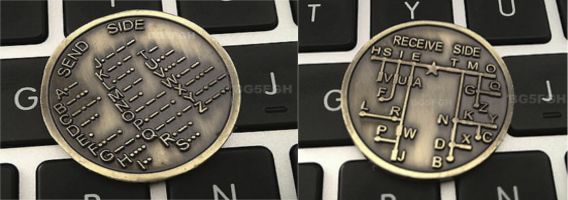
For fun: How can I use these coins for decoding
 |
As long as you retain this notice you can do whatever you want with this stuff on these pages.
If we meet some day, and you think this stuff is worth it, you can buy me a beer in return :-)
(C) Jens Dalsgaard Nielsen
credit for license this goes to phk@FreeBSD.ORG
