
on way - Jens
ESP32 S3 T Display
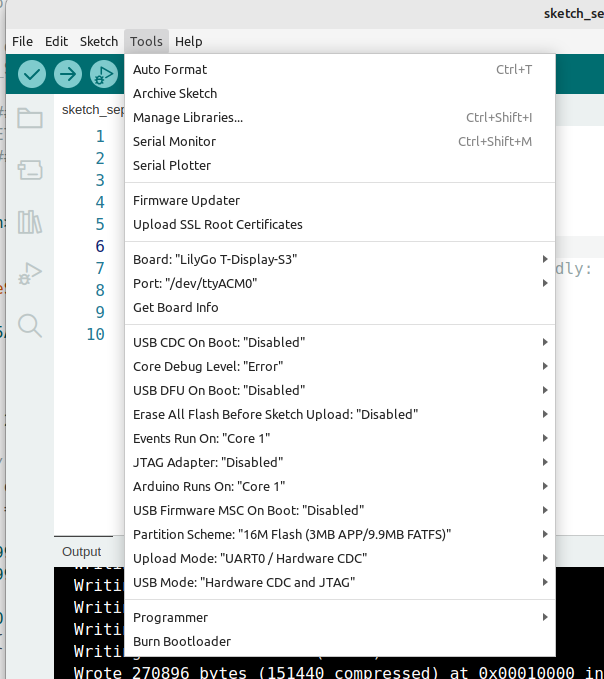
You might have problems with flashing due to wrong configuration
My config is below
I am running Linux Mint - but config is same on windows and MAC afaik
 |
specs might change
About the Lilygo ESP32 S3 T-Display board
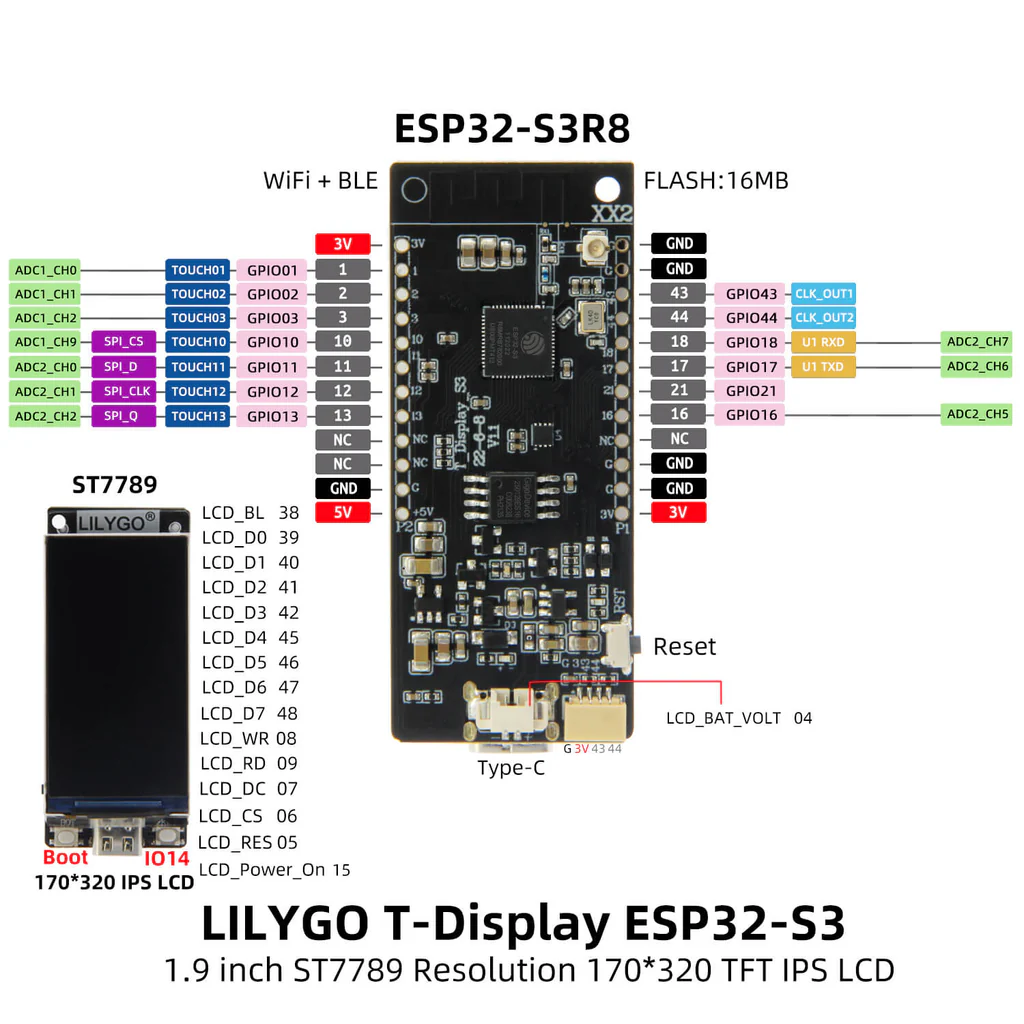 |
ESP32 S3 duo core 240MHz
1.9" 170x240 pixels OLED color
16 MB Flash, 8 MB PSRAM
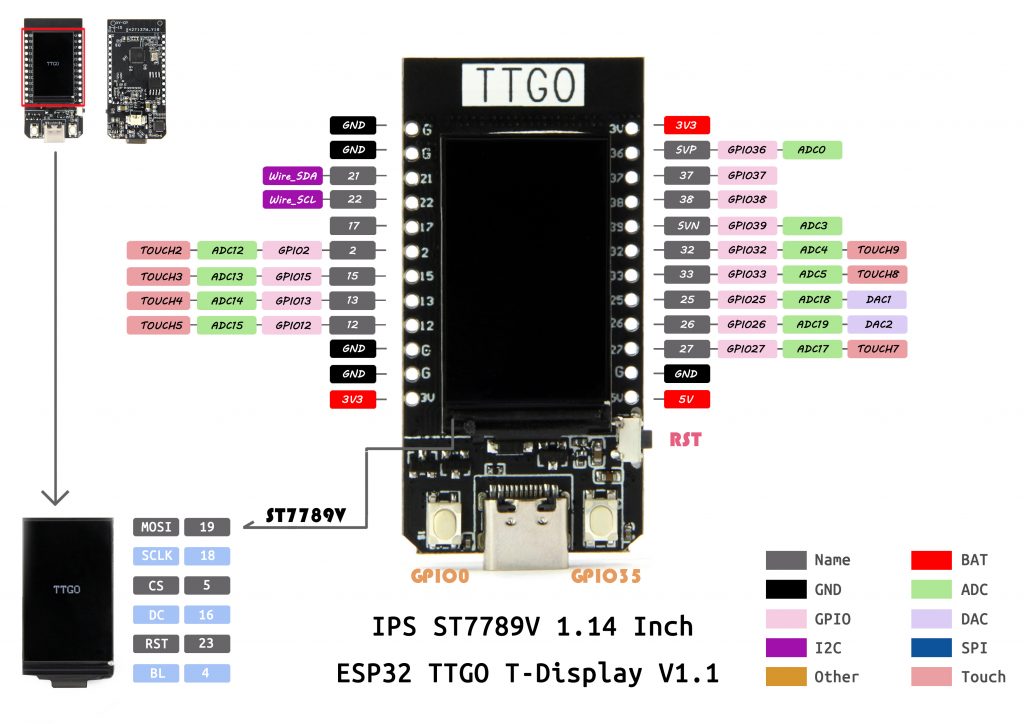
On image below upper left is 0,0 and lower right is 134,239
Uses ST7789V chip as OLED driver ( same as TTGO T1)cp /Des
important to knwo when we are going to configure graphichal driver
 |
More info from producer
https://github.com/Xinyuan-LilyGO/T-Display-S3
Pin info

TFT_eSPI graphics library
TFT_eSPI is part of the Arduino libraries so …
as usual
Sketch->Include Library-> Manage Libraries
Search for TFT_eSPI
Install
QED
 |
Configuration of TFT_eSPI library
The library supports really many graphical devices.
On the TTGO T is a ST7789V graphic chip and it is interfaced by SPI.
So we need to modify a few files in the library to acivate support for it.
So the files located in sketchbook/libraries/TFT_eSPI/ is …
User_Setup.h
User_Setup_Select.h
Modify User_Setup.h
We have to edit in file User_Setup.h
which is located in sketchbook/libraris/TFT_eSPI/
Go to our sketchbook location …/sketchbook
Go down in folder libraries
Go down in folder TFT_eSPI - this is the driver SW
Open file User_Setup.h file in an editor
All lines in the file are from beginning commented out. We do only need to uncomment and correct af few lines
So
We need to activate support for ST7789V chip
approx line 58 uncomment line //#define ST7789_DRIVER/ (just remove the two //)
#define ST7789_DRIVER
And set resolution of display 135x240
approx lines 90 you shall have two lines (you have to correct resolution
#define TFT_WIDTH 135 //
#define TFT_HEIGHT 240 //
(click for see my User_Setup.h file - look for JDN)
//                            USER DEFINED SETTINGS
//   Set driver type, fonts to be loaded, pins used and SPI control method etc
//
//   See the User_Setup_Select.h file if you wish to be able to define multiple
//   setups and then easily select which setup file is used by the compiler.
//
//   If this file is edited correctly then all the library example sketches should
//   run without the need to make any more changes for a particular hardware setup!
//   Note that some sketches are designed for a particular TFT pixel width/height


// ##################################################################################
//
// Section 1. Call up the right driver file and any options for it
//
// ##################################################################################


// SEARCH FOR JDN
// SEARCH FOR JDN
// SEARCH FOR JDN   for config for ttgo t st7789 135x240
// SEARCH FOR JDN
// SEARCH FOR JDN


// Define STM32 to invoke optimised processor support (only for STM32)
//#define STM32

// Defining the STM32 board allows the library to optimise the performance
// for UNO compatible "MCUfriend" style shields
//#define NUCLEO_64_TFT
//#define NUCLEO_144_TFT

// STM32 8 bit parallel only:
// If STN32 Port A or B pins 0-7 are used for 8 bit parallel data bus bits 0-7
// then this will improve rendering performance by a factor of ~8x
//#define STM_PORTA_DATA_BUS
//#define STM_PORTA_DATA_BUS

// Tell the library to use 8 bit parallel mode (otherwise SPI is assumed)
//#define TFT_PARALLEL_8_BIT

// Display type -  only define if RPi display
//#define RPI_DISPLAY_TYPE // 20MHz maximum SPI

// Only define one driver, the other ones must be commented out
//#define ILI9341_DRIVER
//#define ST7735_DRIVER      // Define additional parameters below for this display
//#define ILI9163_DRIVER     // Define additional parameters below for this display
//#define S6D02A1_DRIVER
//#define RPI_ILI9486_DRIVER // 20MHz maximum SPI
//#define HX8357D_DRIVER
//#define ILI9481_DRIVER
//#define ILI9486_DRIVER
//#define ILI9488_DRIVER     // WARNING: Do not connect ILI9488 display SDO to MISO if other devices share the SPI bus (TFT SDO does NOT tristate when CS is high)

//JDN
#define ST7789_DRIVER      // JDN Full configuration option, define additional parameters below for this display


//#define ST7789_2_DRIVER    // Minimal configuration option, define additional parameters below for this display
//#define R61581_DRIVER
//#define RM68140_DRIVER
//#define ST7796_DRIVER
//#define SSD1963_480_DRIVER    // Untested
//#define SSD1963_800_DRIVER    // Untested
//#define SSD1963_800ALT_DRIVER // Untested

// Some displays support SPI reads via the MISO pin, other displays have a single
// bi-directional SDA pin and the library will try to read this via the MOSI line.
// To use the SDA line for reading data from the TFT uncomment the following line:

// #define TFT_SDA_READ      // This option is for ESP32 ONLY, tested with ST7789 display only

// For ST7735, ST7789 and ILI9341 ONLY, define the colour order IF the blue and red are swapped on your display
// Try ONE option at a time to find the correct colour order for your display

//  #define TFT_RGB_ORDER TFT_RGB  // Colour order Red-Green-Blue
//  #define TFT_RGB_ORDER TFT_BGR  // Colour order Blue-Green-Red

// For M5Stack ESP32 module with integrated ILI9341 display ONLY, remove // in line below

// #define M5STACK

// For ST7789, ST7735 and ILI9163 ONLY, define the pixel width and height in portrait orientation
// #define TFT_WIDTH  80

//JDN
#define TFT_WIDTH  135 // JDN ST7789
#define TFT_HEIGHT 240 // JDN ST7789

//#define TFT_WIDTH  240 // ST7789 240 x 240 and 240 x 320
// #define TFT_HEIGHT 160
//#define TFT_HEIGHT 128


//JDN
// #define TFT_HEIGHT 320 // ST7789 240 x 320

// For ST7735 ONLY, define the type of display, originally this was based on the
// colour of the tab on the screen protector film but this is not always true, so try
// out the different options below if the screen does not display graphics correctly,
// e.g. colours wrong, mirror images, or tray pixels at the edges.
// Comment out ALL BUT ONE of these options for a ST7735 display driver, save this
// this User_Setup file, then rebuild and upload the sketch to the board again:

// #define ST7735_INITB
// #define ST7735_GREENTAB
// #define ST7735_GREENTAB2
// #define ST7735_GREENTAB3
// #define ST7735_GREENTAB128    // For 128 x 128 display
// #define ST7735_GREENTAB160x80 // For 160 x 80 display (BGR, inverted, 26 offset)
// #define ST7735_REDTAB
// #define ST7735_BLACKTAB
// #define ST7735_REDTAB160x80   // For 160 x 80 display with 24 pixel offset

// If colours are inverted (white shows as black) then uncomment one of the next
// 2 lines try both options, one of the options should correct the inversion.

// #define TFT_INVERSION_ON
// #define TFT_INVERSION_OFF


// ##################################################################################
//
// Section 2. Define the pins that are used to interface with the display here
//
// ##################################################################################

// If a backlight control signal is available then define the TFT_BL pin in Section 2
// below. The backlight will be turned ON when tft.begin() is called, but the library
// needs to know if the LEDs are ON with the pin HIGH or LOW. If the LEDs are to be
// driven with a PWM signal or turned OFF/ON then this must be handled by the user
// sketch. e.g. with digitalWrite(TFT_BL, LOW);

// #define TFT_BL   32            // LED back-light control pin
// #define TFT_BACKLIGHT_ON HIGH  // Level to turn ON back-light (HIGH or LOW)


// We must use hardware SPI, a minimum of 3 GPIO pins is needed.
// Typical setup for ESP8266 NodeMCU ESP-12 is :
//
// Display SDO/MISO  to NodeMCU pin D6 (or leave disconnected if not reading TFT)
// Display LED       to NodeMCU pin VIN (or 5V, see below)
// Display SCK       to NodeMCU pin D5
// Display SDI/MOSI  to NodeMCU pin D7
// Display DC (RS/AO)to NodeMCU pin D3
// Display RESET     to NodeMCU pin D4 (or RST, see below)
// Display CS        to NodeMCU pin D8 (or GND, see below)
// Display GND       to NodeMCU pin GND (0V)
// Display VCC       to NodeMCU 5V or 3.3V
//
// The TFT RESET pin can be connected to the NodeMCU RST pin or 3.3V to free up a control pin
//
// The DC (Data Command) pin may be labeled AO or RS (Register Select)
//
// With some displays such as the ILI9341 the TFT CS pin can be connected to GND if no more
// SPI devices (e.g. an SD Card) are connected, in this case comment out the #define TFT_CS
// line below so it is NOT defined. Other displays such at the ST7735 require the TFT CS pin
// to be toggled during setup, so in these cases the TFT_CS line must be defined and connected.
//
// The NodeMCU D0 pin can be used for RST
//
//
// Note: only some versions of the NodeMCU provide the USB 5V on the VIN pin
// If 5V is not available at a pin you can use 3.3V but backlight brightness
// will be lower.


// ###### EDIT THE PIN NUMBERS IN THE LINES FOLLOWING TO SUIT YOUR ESP8266 SETUP ######

// For NodeMCU - use pin numbers in the form PIN_Dx where Dx is the NodeMCU pin designation
#define TFT_CS   PIN_D8  // Chip select control pin D8
#define TFT_DC   PIN_D3  // Data Command control pin
#define TFT_RST  PIN_D4  // Reset pin (could connect to NodeMCU RST, see next line)
//#define TFT_RST  -1    // Set TFT_RST to -1 if the display RESET is connected to NodeMCU RST or 3.3V

//#define TFT_BL PIN_D1  // LED back-light (only for ST7789 with backlight control pin)

//#define TOUCH_CS PIN_D2     // Chip select pin (T_CS) of touch screen

//#define TFT_WR PIN_D2       // Write strobe for modified Raspberry Pi TFT only


// ######  FOR ESP8266 OVERLAP MODE EDIT THE PIN NUMBERS IN THE FOLLOWING LINES  ######

// Overlap mode shares the ESP8266 FLASH SPI bus with the TFT so has a performance impact
// but saves pins for other functions. It is best not to connect MISO as some displays
// do not tristate that line wjen chip select is high!
// On NodeMCU 1.0 SD0=MISO, SD1=MOSI, CLK=SCLK to connect to TFT in overlap mode
// On NodeMCU V3  S0 =MISO, S1 =MOSI, S2 =SCLK
// In ESP8266 overlap mode the following must be defined

//#define TFT_SPI_OVERLAP

// In ESP8266 overlap mode the TFT chip select MUST connect to pin D3
//#define TFT_CS   PIN_D3
//#define TFT_DC   PIN_D5  // Data Command control pin
//#define TFT_RST  PIN_D4  // Reset pin (could connect to NodeMCU RST, see next line)
//#define TFT_RST  -1  // Set TFT_RST to -1 if the display RESET is connected to NodeMCU RST or 3.3V


// ###### EDIT THE PIN NUMBERS IN THE LINES FOLLOWING TO SUIT YOUR ESP32 SETUP   ######

// For ESP32 Dev board (only tested with ILI9341 display)
// The hardware SPI can be mapped to any pins

//#define TFT_MISO 19
//#define TFT_MOSI 23
//#define TFT_SCLK 18
//#define TFT_CS   15  // Chip select control pin
//#define TFT_DC    2  // Data Command control pin
//#define TFT_RST   4  // Reset pin (could connect to RST pin)
//#define TFT_RST  -1  // Set TFT_RST to -1 if display RESET is connected to ESP32 board RST

//#define TOUCH_CS 21     // Chip select pin (T_CS) of touch screen

//#define TFT_WR 22    // Write strobe for modified Raspberry Pi TFT only

// For the M5Stack module use these #define lines
//#define TFT_MISO 19
//#define TFT_MOSI 23
//#define TFT_SCLK 18
//#define TFT_CS   14  // Chip select control pin
//#define TFT_DC   27  // Data Command control pin
//#define TFT_RST  33  // Reset pin (could connect to Arduino RESET pin)
//#define TFT_BL   32  // LED back-light (required for M5Stack)

// ######       EDIT THE PINs BELOW TO SUIT YOUR ESP32 PARALLEL TFT SETUP        ######

// The library supports 8 bit parallel TFTs with the ESP32, the pin
// selection below is compatible with ESP32 boards in UNO format.
// Wemos D32 boards need to be modified, see diagram in Tools folder.
// Only ILI9481 and ILI9341 based displays have been tested!

// Parallel bus is only supported for the STM32 and ESP32
// Example below is for ESP32 Parallel interface with UNO displays

// Tell the library to use 8 bit parallel mode (otherwise SPI is assumed)
//#define TFT_PARALLEL_8_BIT

// The ESP32 and TFT the pins used for testing are:
//#define TFT_CS   33  // Chip select control pin (library pulls permanently low
//#define TFT_DC   15  // Data Command control pin - must use a pin in the range 0-31
//#define TFT_RST  32  // Reset pin, toggles on startup

//#define TFT_WR    4  // Write strobe control pin - must use a pin in the range 0-31
//#define TFT_RD    2  // Read strobe control pin

//#define TFT_D0   12  // Must use pins in the range 0-31 for the data bus
//#define TFT_D1   13  // so a single register write sets/clears all bits.
//#define TFT_D2   26  // Pins can be randomly assigned, this does not affect
//#define TFT_D3   25  // TFT screen update performance.
//#define TFT_D4   17
//#define TFT_D5   16
//#define TFT_D6   27
//#define TFT_D7   14

// ######       EDIT THE PINs BELOW TO SUIT YOUR STM32 SPI TFT SETUP        ######

// The TFT can be connected to SPI port 1 or 2
//#define TFT_SPI_PORT 1 // SPI port 1 maximum clock rate is 55MHz
//#define TFT_MOSI PA7
//#define TFT_MISO PA6
//#define TFT_SCLK PA5

//#define TFT_SPI_PORT 2 // SPI port 2 maximum clock rate is 27MHz
//#define TFT_MOSI PB15
//#define TFT_MISO PB14
//#define TFT_SCLK PB13

// Can use Ardiuno pin references, arbitrary allocation, TFT_eSPI controls chip select
//#define TFT_CS   D5 // Chip select control pin to TFT CS
//#define TFT_DC   D6 // Data Command control pin to TFT DC (may be labelled RS = Register Select)
//#define TFT_RST  D7 // Reset pin to TFT RST (or RESET)
// OR alternatively, we can use STM32 port reference names PXnn
//#define TFT_CS   PE11 // Nucleo-F767ZI equivalent of D5
//#define TFT_DC   PE9  // Nucleo-F767ZI equivalent of D6
//#define TFT_RST  PF13 // Nucleo-F767ZI equivalent of D7

//#define TFT_RST  -1   // Set TFT_RST to -1 if the display RESET is connected to processor reset
                        // Use an Arduino pin for initial testing as connecting to processor reset
                        // may not work (pulse too short at power up?)

// ##################################################################################
//
// Section 3. Define the fonts that are to be used here
//
// ##################################################################################

// Comment out the #defines below with // to stop that font being loaded
// The ESP8366 and ESP32 have plenty of memory so commenting out fonts is not
// normally necessary. If all fonts are loaded the extra FLASH space required is
// about 17Kbytes. To save FLASH space only enable the fonts you need!

#define LOAD_GLCD   // Font 1. Original Adafruit 8 pixel font needs ~1820 bytes in FLASH
#define LOAD_FONT2  // Font 2. Small 16 pixel high font, needs ~3534 bytes in FLASH, 96 characters
#define LOAD_FONT4  // Font 4. Medium 26 pixel high font, needs ~5848 bytes in FLASH, 96 characters
#define LOAD_FONT6  // Font 6. Large 48 pixel font, needs ~2666 bytes in FLASH, only characters 1234567890:-.apm
#define LOAD_FONT7  // Font 7. 7 segment 48 pixel font, needs ~2438 bytes in FLASH, only characters 1234567890:-.
#define LOAD_FONT8  // Font 8. Large 75 pixel font needs ~3256 bytes in FLASH, only characters 1234567890:-.
//#define LOAD_FONT8N // Font 8. Alternative to Font 8 above, slightly narrower, so 3 digits fit a 160 pixel TFT
#define LOAD_GFXFF  // FreeFonts. Include access to the 48 Adafruit_GFX free fonts FF1 to FF48 and custom fonts

// Comment out the #define below to stop the SPIFFS filing system and smooth font code being loaded
// this will save ~20kbytes of FLASH
#define SMOOTH_FONT


// ##################################################################################
//
// Section 4. Other options
//
// ##################################################################################

// Define the SPI clock frequency, this affects the graphics rendering speed. Too
// fast and the TFT driver will not keep up and display corruption appears.
// With an ILI9341 display 40MHz works OK, 80MHz sometimes fails
// With a ST7735 display more than 27MHz may not work (spurious pixels and lines)
// With an ILI9163 display 27 MHz works OK.

// #define SPI_FREQUENCY   1000000
// #define SPI_FREQUENCY   5000000
// #define SPI_FREQUENCY  10000000
// #define SPI_FREQUENCY  20000000
#define SPI_FREQUENCY  27000000
// #define SPI_FREQUENCY  40000000
// #define SPI_FREQUENCY  55000000 // STM32 SPI1 only (SPI2 maximum is 27MHz)
// #define SPI_FREQUENCY  80000000

// Optional reduced SPI frequency for reading TFT
#define SPI_READ_FREQUENCY  20000000

// The XPT2046 requires a lower SPI clock rate of 2.5MHz so we define that here:
#define SPI_TOUCH_FREQUENCY  2500000

// The ESP32 has 2 free SPI ports i.e. VSPI and HSPI, the VSPI is the default.
// If the VSPI port is in use and pins are not accessible (e.g. TTGO T-Beam)
// then uncomment the following line:
//#define USE_HSPI_PORT

// Comment out the following #define if "SPI Transactions" do not need to be
// supported. When commented out the code size will be smaller and sketches will
// run slightly faster, so leave it commented out unless you need it!

// Transaction support is needed to work with SD library but not needed with TFT_SdFat
// Transaction support is required if other SPI devices are connected.

// Transactions are automatically enabled by the library for an ESP32 (to use HAL mutex)
// so changing it here has no effect

// #define SUPPORT_TRANSACTIONS
Modify User_Setup_Select.h
We need to have correct include file path. This is given in User_Setup_Select.h
All lines are commented out (as you can see support fore weird many displays)
You need to uncomment one line:
So open the file in your texteditor and uncomment so you will have driver no 25 active…
(click for see the file - look for JDN)
// This header file contains a list of user setup files and defines which one the
// compiler uses when the IDE performs a Verify/Compile or Upload.
//
// Users can create configurations for different Espressif boards and TFT displays.
// This makes selecting between hardware setups easy by "uncommenting" one line.

// The advantage of this hardware configuration method is that the examples provided
// with the library should work with different setups immediately without any other
// changes being needed. It also improves the portability of users sketches to other
// hardware configurations and compatible libraries.
//
// Create a shortcut to this file on your desktop to permit quick access for editing.
// Re-compile and upload after making and saving any changes to this file.

// Customised User_Setup files are stored in the "User_Setups" folder.

#ifndef USER_SETUP_LOADED //  Lets PlatformIO users define settings in
                          //  platformio.ini, see notes in "Tools" folder.

// Only ONE line below should be uncommented.  Add extra lines and files as needed.

#include <User_Setup.h>           // Default setup is root library folder

//#include <User_Setups/Setup1_ILI9341.h>  // Setup file configured for my ILI9341
//#include <User_Setups/Setup2_ST7735.h>   // Setup file configured for my ST7735
//#include <User_Setups/Setup3_ILI9163.h>  // Setup file configured for my ILI9163
//#include <User_Setups/Setup4_S6D02A1.h>  // Setup file configured for my S6D02A1
//#include <User_Setups/Setup5_RPi_ILI9486.h>        // Setup file configured for my stock RPi TFT
//#include <User_Setups/Setup6_RPi_Wr_ILI9486.h>     // Setup file configured for my modified RPi TFT
//#include <User_Setups/Setup7_ST7735_128x128.h>     // Setup file configured for my ST7735 128x128 display
//#include <User_Setups/Setup8_ILI9163_128x128.h>    // Setup file configured for my ILI9163 128x128 display
//#include <User_Setups/Setup9_ST7735_Overlap.h>     // Setup file configured for my ST7735
//#include <User_Setups/Setup10_RPi_touch_ILI9486.h> // Setup file configured for ESP8266 and RPi TFT with touch

//#include <User_Setups/Setup11_RPi_touch_ILI9486.h> // Setup file configured for ESP32 and RPi TFT with touch
//#include <User_Setups/Setup12_M5Stack.h>           // Setup file for the ESP32 based M5Stack
//#include <User_Setups/Setup13_ILI9481_Parallel.h>  // Setup file for the ESP32 with parallel bus TFT
//#include <User_Setups/Setup14_ILI9341_Parallel.h>  // Setup file for the ESP32 with parallel bus TFT
//#include <User_Setups/Setup15_HX8357D.h>           // Setup file configured for HX8357D (untested)
//#include <User_Setups/Setup16_ILI9488_Parallel.h>  // Setup file for the ESP32 with parallel bus TFT
//#include <User_Setups/Setup17_ePaper.h>            // Setup file for any Waveshare ePaper display
//#include <User_Setups/Setup18_ST7789.h>            // Setup file configured for ST7789

//#include <User_Setups/Setup19_RM68140_Parallel.h>	 // Setup file configured for RM68140 with parallel bus

//#include <User_Setups/Setup20_ILI9488.h>           // Setup file for ESP8266 and ILI9488 SPI bus TFT
//#include <User_Setups/Setup21_ILI9488.h>           // Setup file for ESP32 and ILI9488 SPI bus TFT

//#include <User_Setups/Setup22_TTGO_T4.h>           // Setup file for ESP32 and TTGO T4 version 1.2
//#include <User_Setups/Setup22_TTGO_T4_v1.3.h>      // Setup file for ESP32 and TTGO T4 version 1.3
//#include <User_Setups/Setup23_TTGO_TM.h>           // Setup file for ESP32 and TTGO TM ST7789 SPI bus TFT
//#include <User_Setups/Setup24_ST7789.h>            // Setup file configured for ST7789 240 x 240

// JDN nov 2020
 #include <User_Setups/Setup25_TTGO_T_Display.h>    // JDN Setup file for ESP32 and TTGO T-Display ST7789V SPI bus TFT
// JDN nov 2020


//#include <User_Setups/Setup26_TTGO_T_Wristband.h>  // Setup file for ESP32 and TTGO T-Wristband ST7735 SPI bus TFT

//#include <User_Setups/Setup27_RPi_ST7796_ESP32.h>    // ESP32   RPi MHS-4.0 inch Display-B
//#include <User_Setups/Setup28_RPi_ST7796_ESP8266.h>  // ESP8266 RPi MHS-4.0 inch Display-B

//#include <User_Setups/Setup29_ILI9341_STM32.h>          // Setup for Nucleo board
//#include <User_Setups/Setup30_ILI9341_Parallel_STM32.h> // Setup for Nucleo board and parallel display
//#include <User_Setups/Setup31_ST7796_Parallel_STM32.h>  // Setup for Nucleo board and parallel display
//#include <User_Setups/Setup32_ILI9341_STM32F103.h>      // Setup for "Blue/Black Pill"

//#include <User_Setups/Setup33_RPi_ILI9486_STM32.h>      // Setup for Nucleo board

//#include <User_Setups/Setup34_ILI9481_Parallel_STM32.h> // Setup for Nucleo board and parallel display
//#include <User_Setups/Setup35_ILI9341_STM32_Port_Bus.h> // Setup for STM32 port A parallel display

//#include <User_Setups/Setup36_RPi_touch_ILI9341.h>      // Setup file configured for ESP32 and RPi TFT with touch

//#include <User_Setups/Setup43_ST7735.h>            // Setup file configured for my ST7735S 80x160
//#include <User_Setups/Setup44_TTGO_CameraPlus.h>   // Setup file for ESP32 and TTGO T-CameraPlus ST7789 SPI bus TFT    240x240
//#include <User_Setups/Setup45_TTGO_T_Watch.h>      // Setup file for ESP32 and TTGO T-Watch ST7789 SPI bus TFT  240x240

//#include <User_Setups/Setup50_SSD1963_Parallel.h>  // Setup file for ESP32 and SSD1963 TFT display

//#include <User_Setups/Setup135_ST7789.h>           // Setup file for ESP8266 and ST7789 135 x 240 TFT

//#include <User_Setups/SetupX_Template.h>


#endif // USER_SETUP_LOADED


/////////////////////////////////////////////////////////////////////////////////////
//                                                                                 //
//     DON'T TINKER WITH ANY OF THE FOLLOWING LINES, THESE ADD THE TFT DRIVERS     //
//       AND ESP8266 PIN DEFINITONS, THEY ARE HERE FOR BODMER'S CONVENIENCE!       //
//                                                                                 //
/////////////////////////////////////////////////////////////////////////////////////


// Identical looking TFT displays may have a different colour ordering in the 16 bit colour
#define TFT_BGR 0   // Colour order Blue-Green-Red
#define TFT_RGB 1   // Colour order Red-Green-Blue

// Legacy setup support, RPI_DISPLAY_TYPE replaces RPI_DRIVER
#if defined (RPI_DRIVER)
  #if !defined (RPI_DISPLAY_TYPE)
    #define RPI_DISPLAY_TYPE
  #endif
#endif

// Legacy setup support, RPI_ILI9486_DRIVER form is deprecated
// Instead define RPI_DISPLAY_TYPE and also define driver (e.g. ILI9486_DRIVER)
#if defined (RPI_ILI9486_DRIVER)
  #if !defined (ILI9486_DRIVER)
    #define ILI9486_DRIVER
  #endif
  #if !defined (RPI_DISPLAY_TYPE)
    #define RPI_DISPLAY_TYPE
  #endif
#endif

// Load the right driver definition - do not tinker here !
#if   defined (ILI9341_DRIVER)
     #include <TFT_Drivers/ILI9341_Defines.h>
     #define  TFT_DRIVER 0x9341
#elif defined (ST7735_DRIVER)
     #include <TFT_Drivers/ST7735_Defines.h>
     #define  TFT_DRIVER 0x7735
#elif defined (ILI9163_DRIVER)
     #include <TFT_Drivers/ILI9163_Defines.h>
     #define  TFT_DRIVER 0x9163
#elif defined (S6D02A1_DRIVER)
     #include <TFT_Drivers/S6D02A1_Defines.h>
     #define  TFT_DRIVER 0x6D02
#elif defined (ST7796_DRIVER)
      #include "TFT_Drivers/ST7796_Defines.h"
      #define  TFT_DRIVER 0x7796
#elif defined (ILI9486_DRIVER)
     #include <TFT_Drivers/ILI9486_Defines.h>
     #define  TFT_DRIVER 0x9486
#elif defined (ILI9481_DRIVER)
     #include <TFT_Drivers/ILI9481_Defines.h>
     #define  TFT_DRIVER 0x9481
#elif defined (ILI9488_DRIVER)
     #include <TFT_Drivers/ILI9488_Defines.h>
     #define  TFT_DRIVER 0x9488
#elif defined (HX8357D_DRIVER)
     #include "TFT_Drivers/HX8357D_Defines.h"
     #define  TFT_DRIVER 0x8357
#elif defined (EPD_DRIVER)
     #include "TFT_Drivers/EPD_Defines.h"
     #define  TFT_DRIVER 0xE9D
#elif defined (ST7789_DRIVER)
     #include "TFT_Drivers/ST7789_Defines.h"
     #define  TFT_DRIVER 0x7789
#elif defined (R61581_DRIVER)
     #include "TFT_Drivers/R61581_Defines.h"
     #define  TFT_DRIVER 0x6158
#elif defined (ST7789_2_DRIVER)
     #include "TFT_Drivers/ST7789_2_Defines.h"
     #define  TFT_DRIVER 0x778B
#elif defined (RM68140_DRIVER)
     #include "TFT_Drivers/RM68140_Defines.h"
     #define  TFT_DRIVER 0x6814
#elif defined (SSD1963_480_DRIVER)
     #include "TFT_Drivers/SSD1963_Defines.h"
     #define  TFT_DRIVER 0x1963
#elif defined (SSD1963_800_DRIVER)
     #include "TFT_Drivers/SSD1963_Defines.h"
     #define  TFT_DRIVER 0x1963
#elif defined (SSD1963_800ALT_DRIVER)
     #include "TFT_Drivers/SSD1963_Defines.h"
     #define  TFT_DRIVER 0x1963
#elif defined (SSD1963_800BD_DRIVER)
     #include "TFT_Drivers/SSD1963_Defines.h"
     #define  TFT_DRIVER 0x1963
#elif defined (GC9A01_DRIVER)
     #include "TFT_Drivers/GC9A01_Defines.h"
     #define  TFT_DRIVER 0x9A01
                              // <<<<<<<<<<<<<<<<<<<<<<<< ADD NEW DRIVER HERE
                              // XYZZY_init.h and XYZZY_rotation.h must also be added in TFT_eSPI.cpp
#elif defined (XYZZY_DRIVER)
     #include "TFT_Drivers/XYZZY_Defines.h"
     #define  TFT_DRIVER 0x0000
#else
     #define  TFT_DRIVER 0x0000
#endif


// These are the pins for ESP8266 boards
//      Name   GPIO    NodeMCU      Function
#define PIN_D0  16  // GPIO16       WAKE
#define PIN_D1   5  // GPIO5        User purpose
#define PIN_D2   4  // GPIO4        User purpose
#define PIN_D3   0  // GPIO0        Low on boot means enter FLASH mode
#define PIN_D4   2  // GPIO2        TXD1 (must be high on boot to go to UART0 FLASH mode)
#define PIN_D5  14  // GPIO14       HSCLK
#define PIN_D6  12  // GPIO12       HMISO
#define PIN_D7  13  // GPIO13       HMOSI  RXD2
#define PIN_D8  15  // GPIO15       HCS    TXD0 (must be low on boot to enter UART0 FLASH mode)
#define PIN_D9   3  //              RXD0
#define PIN_D10  1  //              TXD0

#define PIN_MOSI 8  // SD1          FLASH and overlap mode
#define PIN_MISO 7  // SD0
#define PIN_SCLK 6  // CLK
#define PIN_HWCS 0  // D3

#define PIN_D11  9  // SD2
#define PIN_D12 10  // SD4
Examples
See examples -> TFT_eSPI -> etc
Be aware some examples are for larger displays then 135x240
I have - with succes - tested examples ->TFT-eSPI->320x240->TFTMeters
/*
  Example animated analogue meters using a ILI9341 TFT LCD screen

  Needs Font 2 (also Font 4 if using large scale label)

  Make sure all the display driver and pin comnenctions are correct by
  editting the User_Setup.h file in the TFT_eSPI library folder.

  #########################################################################
  ###### DON'T FORGET TO UPDATE THE User_Setup.h FILE IN THE LIBRARY ######
  #########################################################################
*/

#include <TFT_eSPI.h> // Hardware-specific library
#include <SPI.h>

TFT_eSPI tft = TFT_eSPI();       // Invoke custom library

#define TFT_GREY 0x5AEB

#define LOOP_PERIOD 35 // Display updates every 35 ms

float ltx = 0;    // Saved x coord of bottom of needle
uint16_t osx = 120, osy = 120; // Saved x & y coords
uint32_t updateTime = 0;       // time for next update

int old_analog =  -999; // Value last displayed
int old_digital = -999; // Value last displayed

int value[6] = {0, 0, 0, 0, 0, 0};
int old_value[6] = { -1, -1, -1, -1, -1, -1};
int d = 0;

void setup(void) {
  tft.init();
  tft.setRotation(1);
  Serial.begin(57600); // For debug
  tft.fillScreen(TFT_BLACK);

  analogMeter(); // Draw analogue meter

  // Draw 6 linear meters
  byte d = 40;
  plotLinear("A0", 0, 160);
  plotLinear("A1", 1 * d, 160);
  plotLinear("A2", 2 * d, 160);
  plotLinear("A3", 3 * d, 160);
  plotLinear("A4", 4 * d, 160);
  plotLinear("A5", 5 * d, 160);

  updateTime = millis(); // Next update time
}


void loop() {
  if (updateTime <= millis()) {
    updateTime = millis() + LOOP_PERIOD;

    d += 4; if (d >= 360) d = 0;

    //value[0] = map(analogRead(A0), 0, 1023, 0, 100); // Test with value form Analogue 0

    // Create a Sine wave for testing
    value[0] = 50 + 50 * sin((d + 0) * 0.0174532925);
    value[1] = 50 + 50 * sin((d + 60) * 0.0174532925);
    value[2] = 50 + 50 * sin((d + 120) * 0.0174532925);
    value[3] = 50 + 50 * sin((d + 180) * 0.0174532925);
    value[4] = 50 + 50 * sin((d + 240) * 0.0174532925);
    value[5] = 50 + 50 * sin((d + 300) * 0.0174532925);

    //unsigned long t = millis();

    plotPointer();

    plotNeedle(value[0], 0);

    //Serial.println(millis()-t); // Print time taken for meter update
  }
}


// #########################################################################
//  Draw the analogue meter on the screen
// #########################################################################
void analogMeter()
{
  // Meter outline
  tft.fillRect(0, 0, 239, 126, TFT_GREY);
  tft.fillRect(5, 3, 230, 119, TFT_WHITE);

  tft.setTextColor(TFT_BLACK);  // Text colour

  // Draw ticks every 5 degrees from -50 to +50 degrees (100 deg. FSD swing)
  for (int i = -50; i < 51; i += 5) {
    // Long scale tick length
    int tl = 15;

    // Coodinates of tick to draw
    float sx = cos((i - 90) * 0.0174532925);
    float sy = sin((i - 90) * 0.0174532925);
    uint16_t x0 = sx * (100 + tl) + 120;
    uint16_t y0 = sy * (100 + tl) + 140;
    uint16_t x1 = sx * 100 + 120;
    uint16_t y1 = sy * 100 + 140;

    // Coordinates of next tick for zone fill
    float sx2 = cos((i + 5 - 90) * 0.0174532925);
    float sy2 = sin((i + 5 - 90) * 0.0174532925);
    int x2 = sx2 * (100 + tl) + 120;
    int y2 = sy2 * (100 + tl) + 140;
    int x3 = sx2 * 100 + 120;
    int y3 = sy2 * 100 + 140;

    // Yellow zone limits
    //if (i >= -50 && i < 0) {
    //  tft.fillTriangle(x0, y0, x1, y1, x2, y2, TFT_YELLOW);
    //  tft.fillTriangle(x1, y1, x2, y2, x3, y3, TFT_YELLOW);
    //}

    // Green zone limits
    if (i >= 0 && i < 25) {
      tft.fillTriangle(x0, y0, x1, y1, x2, y2, TFT_GREEN);
      tft.fillTriangle(x1, y1, x2, y2, x3, y3, TFT_GREEN);
    }

    // Orange zone limits
    if (i >= 25 && i < 50) {
      tft.fillTriangle(x0, y0, x1, y1, x2, y2, TFT_ORANGE);
      tft.fillTriangle(x1, y1, x2, y2, x3, y3, TFT_ORANGE);
    }

    // Short scale tick length
    if (i % 25 != 0) tl = 8;

    // Recalculate coords incase tick lenght changed
    x0 = sx * (100 + tl) + 120;
    y0 = sy * (100 + tl) + 140;
    x1 = sx * 100 + 120;
    y1 = sy * 100 + 140;

    // Draw tick
    tft.drawLine(x0, y0, x1, y1, TFT_BLACK);

    // Check if labels should be drawn, with position tweaks
    if (i % 25 == 0) {
      // Calculate label positions
      x0 = sx * (100 + tl + 10) + 120;
      y0 = sy * (100 + tl + 10) + 140;
      switch (i / 25) {
        case -2: tft.drawCentreString("0", x0, y0 - 12, 2); break;
        case -1: tft.drawCentreString("25", x0, y0 - 9, 2); break;
        case 0: tft.drawCentreString("50", x0, y0 - 6, 2); break;
        case 1: tft.drawCentreString("75", x0, y0 - 9, 2); break;
        case 2: tft.drawCentreString("100", x0, y0 - 12, 2); break;
      }
    }

    // Now draw the arc of the scale
    sx = cos((i + 5 - 90) * 0.0174532925);
    sy = sin((i + 5 - 90) * 0.0174532925);
    x0 = sx * 100 + 120;
    y0 = sy * 100 + 140;
    // Draw scale arc, don't draw the last part
    if (i < 50) tft.drawLine(x0, y0, x1, y1, TFT_BLACK);
  }

  tft.drawString("%RH", 5 + 230 - 40, 119 - 20, 2); // Units at bottom right
  tft.drawCentreString("%RH", 120, 70, 4); // Comment out to avoid font 4
  tft.drawRect(5, 3, 230, 119, TFT_BLACK); // Draw bezel line

  plotNeedle(0, 0); // Put meter needle at 0
}

// #########################################################################
// Update needle position
// This function is blocking while needle moves, time depends on ms_delay
// 10ms minimises needle flicker if text is drawn within needle sweep area
// Smaller values OK if text not in sweep area, zero for instant movement but
// does not look realistic... (note: 100 increments for full scale deflection)
// #########################################################################
void plotNeedle(int value, byte ms_delay)
{
  tft.setTextColor(TFT_BLACK, TFT_WHITE);
  char buf[8]; dtostrf(value, 4, 0, buf);
  tft.drawRightString(buf, 40, 119 - 20, 2);

  if (value < -10) value = -10; // Limit value to emulate needle end stops
  if (value > 110) value = 110;

  // Move the needle util new value reached
  while (!(value == old_analog)) {
    if (old_analog < value) old_analog++;
    else old_analog--;

    if (ms_delay == 0) old_analog = value; // Update immediately id delay is 0

    float sdeg = map(old_analog, -10, 110, -150, -30); // Map value to angle
    // Calcualte tip of needle coords
    float sx = cos(sdeg * 0.0174532925);
    float sy = sin(sdeg * 0.0174532925);

    // Calculate x delta of needle start (does not start at pivot point)
    float tx = tan((sdeg + 90) * 0.0174532925);

    // Erase old needle image
    tft.drawLine(120 + 20 * ltx - 1, 140 - 20, osx - 1, osy, TFT_WHITE);
    tft.drawLine(120 + 20 * ltx, 140 - 20, osx, osy, TFT_WHITE);
    tft.drawLine(120 + 20 * ltx + 1, 140 - 20, osx + 1, osy, TFT_WHITE);

    // Re-plot text under needle
    tft.setTextColor(TFT_BLACK);
    tft.drawCentreString("%RH", 120, 70, 4); // // Comment out to avoid font 4

    // Store new needle end coords for next erase
    ltx = tx;
    osx = sx * 98 + 120;
    osy = sy * 98 + 140;

    // Draw the needle in the new postion, magenta makes needle a bit bolder
    // draws 3 lines to thicken needle
    tft.drawLine(120 + 20 * ltx - 1, 140 - 20, osx - 1, osy, TFT_RED);
    tft.drawLine(120 + 20 * ltx, 140 - 20, osx, osy, TFT_MAGENTA);
    tft.drawLine(120 + 20 * ltx + 1, 140 - 20, osx + 1, osy, TFT_RED);

    // Slow needle down slightly as it approaches new postion
    if (abs(old_analog - value) < 10) ms_delay += ms_delay / 5;

    // Wait before next update
    delay(ms_delay);
  }
}

// #########################################################################
//  Draw a linear meter on the screen
// #########################################################################
void plotLinear(char *label, int x, int y)
{
  int w = 36;
  tft.drawRect(x, y, w, 155, TFT_GREY);
  tft.fillRect(x + 2, y + 19, w - 3, 155 - 38, TFT_WHITE);
  tft.setTextColor(TFT_CYAN, TFT_BLACK);
  tft.drawCentreString(label, x + w / 2, y + 2, 2);

  for (int i = 0; i < 110; i += 10)
  {
    tft.drawFastHLine(x + 20, y + 27 + i, 6, TFT_BLACK);
  }

  for (int i = 0; i < 110; i += 50)
  {
    tft.drawFastHLine(x + 20, y + 27 + i, 9, TFT_BLACK);
  }

  tft.fillTriangle(x + 3, y + 127, x + 3 + 16, y + 127, x + 3, y + 127 - 5, TFT_RED);
  tft.fillTriangle(x + 3, y + 127, x + 3 + 16, y + 127, x + 3, y + 127 + 5, TFT_RED);

  tft.drawCentreString("---", x + w / 2, y + 155 - 18, 2);
}

// #########################################################################
//  Adjust 6 linear meter pointer positions
// #########################################################################
void plotPointer(void)
{
  int dy = 187;
  byte pw = 16;

  tft.setTextColor(TFT_GREEN, TFT_BLACK);

  // Move the 6 pointers one pixel towards new value
  for (int i = 0; i < 6; i++)
  {
    char buf[8]; dtostrf(value[i], 4, 0, buf);
    tft.drawRightString(buf, i * 40 + 36 - 5, 187 - 27 + 155 - 18, 2);

    int dx = 3 + 40 * i;
    if (value[i] < 0) value[i] = 0; // Limit value to emulate needle end stops
    if (value[i] > 100) value[i] = 100;

    while (!(value[i] == old_value[i])) {
      dy = 187 + 100 - old_value[i];
      if (old_value[i] > value[i])
      {
        tft.drawLine(dx, dy - 5, dx + pw, dy, TFT_WHITE);
        old_value[i]--;
        tft.drawLine(dx, dy + 6, dx + pw, dy + 1, TFT_RED);
      }
      else
      {
        tft.drawLine(dx, dy + 5, dx + pw, dy, TFT_WHITE);
        old_value[i]++;
        tft.drawLine(dx, dy - 6, dx + pw, dy - 1, TFT_RED);
      }
    }
  }
}
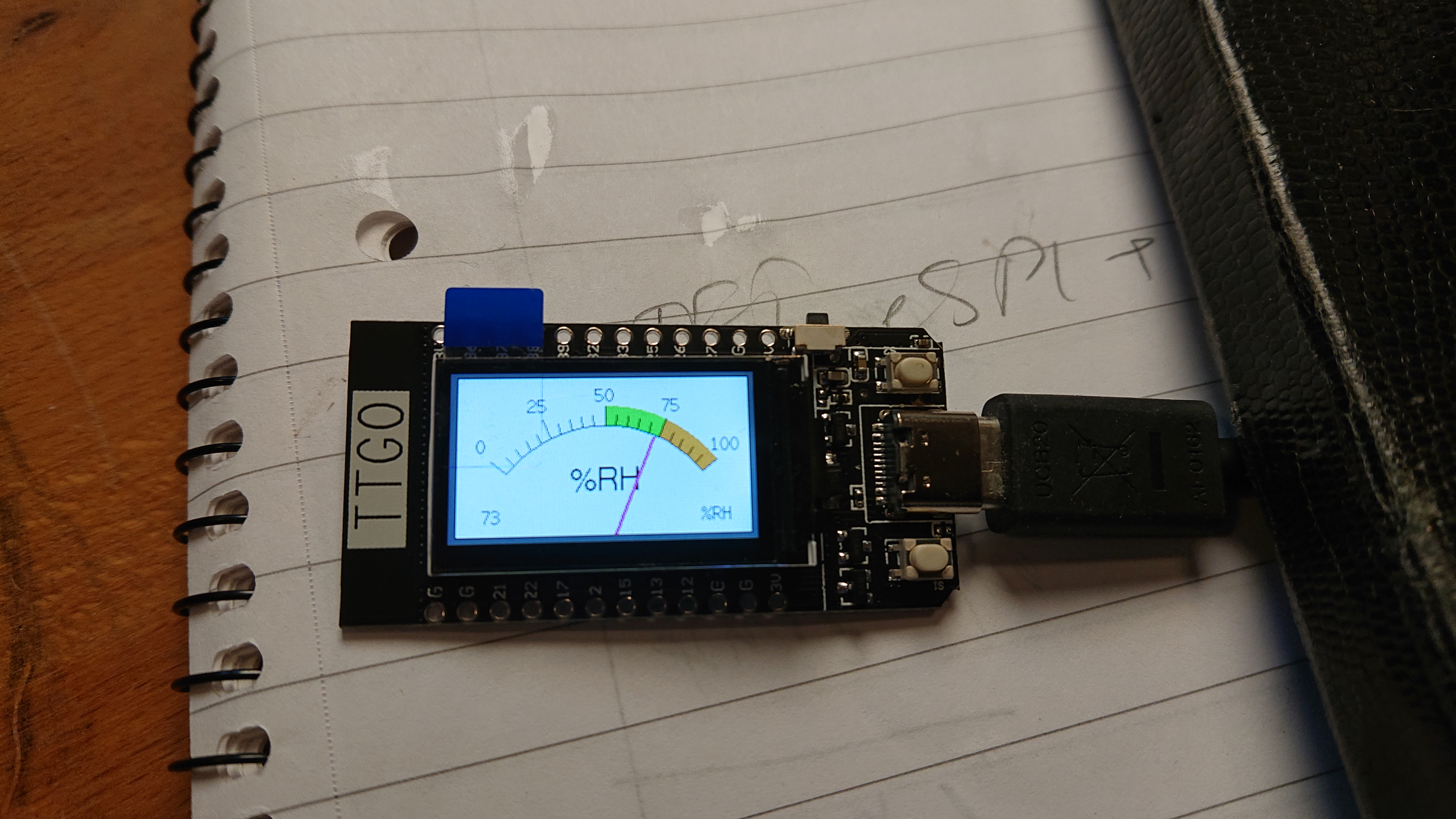
The display shows
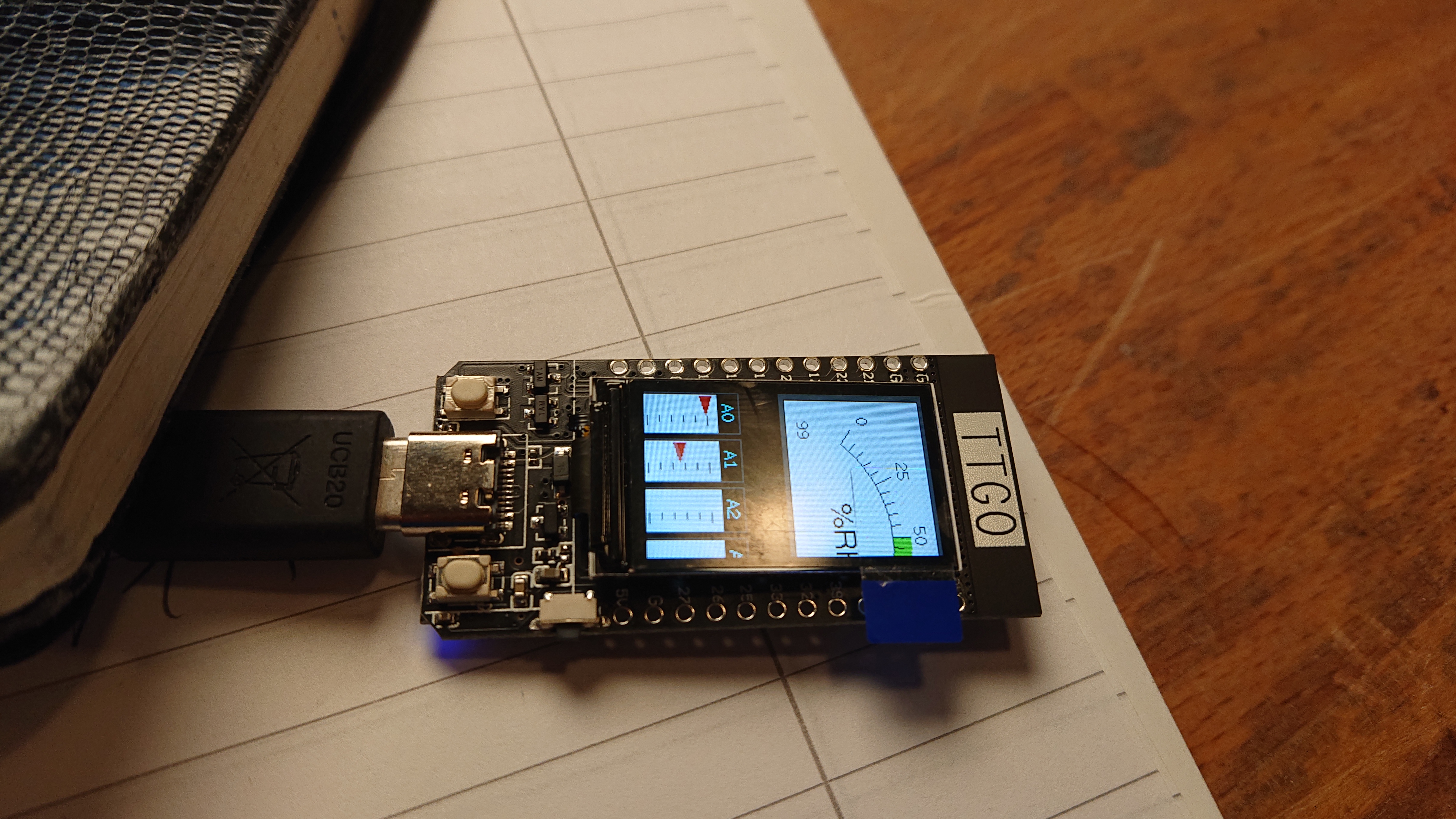 |
Looks weird - its because it thinks itas 320x240 display
A hack - rotate it - this will not solve the problem but looks better
I think the chip just dont draw stuff outside the display :-)
In the setup function just change tft.setRotation(0); to tft.setRotation(1);
Happy hacking
 |
END OF DOCU
OLD STUFF FROM HERE
Wi-Fi
Standard FCCCE-REDICTELECKCCSRRCNCC(esp32 chip) Protocol 802.11 bgn(802.11n,speed up to150Mbps)A-MPDU and A-MSDU polymerization,support 0.4μS Protection interval Frequency range 2.4GHz 2.5GHz(2400M 2483.5M) Transmit Power 22dBm Communication distance 300m
Bluetooth
Protocol Meet bluetooth v4.2BR/EDR and BLE standard Radio frequency With -97dBm sensitivity NZIF receiver Class-1,Class-2&Class-3 emitter AFH Audio frequency CVSD&SBC audio frequency
Software specification
Wi-Fi Mode StationSoftAPSoftAPStationP2P Security mechanism WPAWPA2WPA2-EnterpriseWPS Encryption Type AESRSAECCSHA Firmware upgrade UART downloadOTA(Through networkhost to download and write firmware) Software Development Support cloud server development SDK for user firmware development Networking protocol IPv4、IPv6、SSL、TCPUDPHTTPFTPMQTT User Configuration AT Instruction set, cloud server, android/iOSapp OS FreeRTOS
As long as you retain this notice you can do whatever you want with this stuff on these pages.
If we meet some day, and you think this stuff is worth it, you can buy me a beer in return :-)
(C) Jens Dalsgaard Nielsen
credit for license this goes to phk@FreeBSD.ORG
