
under construction
ESP 32 Graphics
in Arduino IDE
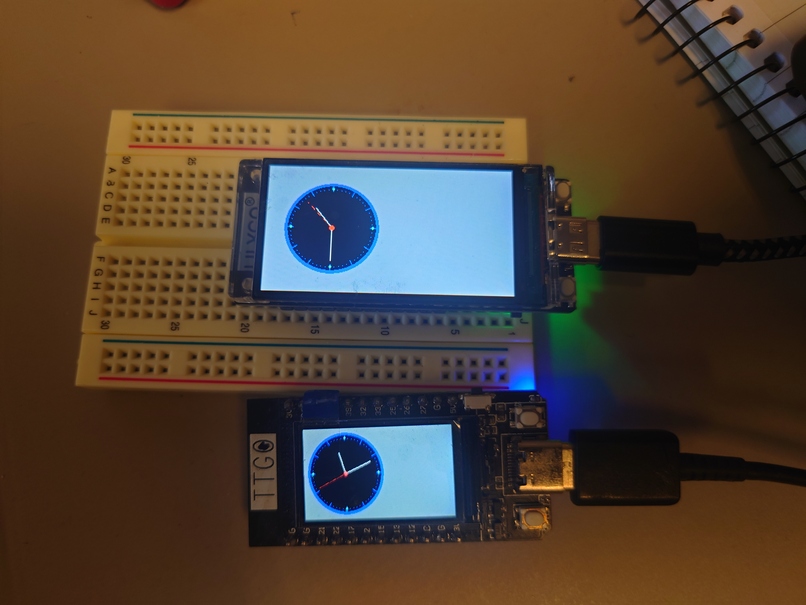 |
Tested on
TTGO T1
Lilygo T-Display S3
The manual
All examples from TFT_eSPI can be found here:
Src folder list: here
Status
As time of writing its tested with
Lilygo T-Display S3
STY7789 graphic chip
170 x 320 pixels
TTGO T1 ttgo-t
STY7789 graphic chip
135*240 pixels
Step by step install
We will install TFT_eSPI by Bomer
Tak a look or search in Arduino library manager
select ttgo t1 or lilygo T-Display S3 as controller
so you can find libraries
open library manager
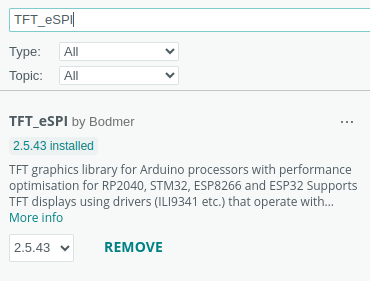
search for TFT_eSPI by Bomer
install it (time of writing vrs 2.5.43)
 |
ESP32-S3 T-Display extra SW to be installed
For the ESP32-S3 T-Display you need to download and install one more library. See lilygo-s3-t-display/s3display.html
Configuration to your controller
You must edit two files in the library sec your path to … sketchbook/libraries/TFT_eSPI
The two files are
User_Setup.h
User_Setup_Select.h
Look in Src folder list: here
You will something like
        examples
            graphics
                analogclock.ino
            meter
                meter.ino
        lilygo-T-Display-S3
            User_Setup.h
            User_Setup_Select.h
        ttgo-t1
            User_Setup.h
            User_Setup_Select.h
So here you can pick up the precooked setup files.
XXXXXXXXXXXXXXXXXXXxxxx
About graphics
ESP32 graphics setup
We are using TFT_eSPI library which is in the Arduino package system.
Config:
fragment from the config files

In User_Setup.h
uncomment for the divice you are using

// JDNMOD ONLY ONE BELOW
// JDNMOD nov 2020/2024 for TTGO T1 below
#include <User_Setups/Setup25_TTGO_T_Display.h>    // JDN Setup file for ESP32 and TTGO T-Display ST7789V SPI bus TFT
// JDN nov 2020

//JDNMOD sep 24 for Se T-Display
//#include <User_Setups/Setup206_LilyGo_T_Display_S3.h> // JDN Setup file for ESP32-S3 lilygo T-Display
//JDN ENDE


In User_Setup_Select.h

uncomment for the divice you are using

// JDNMOD ONLY ONE BELOW
// JDNMOD  belowfor TTGO T1
//#include <User_Setups/Setup25_TTGO_T_Display.h>    // Setup file for ESP32 and TTGO T-Display ST7789V SPI bus TFT
// JDNMOD ENDE

//JDNMOD BELOW sep 24 for S3 T-Display
//#include <User_Setups/Setup206_LilyGo_T_Display_S3.h>     // For the LilyGo T-Display S3 based ESP32S3 with ST7789 170 x 320 TFT
// JDNMOD ENDE
ESP32-S3 T-Display extras
For the ESP32-S3 T-Display you need to download and install one more library. See lilygo-s3-t-display/s3display.html
A copy of the library as zipfile T-Display-S3-main.zip
BOOT PROBLEMS
attach to PC usb port
hold the board with display up and usb port towards your body
BOOT button is on top on left side - press it and keep it pressed
Press RST(reset) button - left side on button towards you
Release RSt button
Release BOOT button
For the TTGO the same procedure
RST button is on top right side
GPIO0 is BOOT on left site
the other button is connected to GPIO 35
So just swapped compared to the lilygo
New
Hacks - Added about I2C on different pins
Re Open source
Much of the esp32 code libraries is open but the code close to HW (wifi,…) is closed source.
XXXXXXXXXXXXXXXXXXXXXx
TFT_eSPI by Bomer
Libs to be installed
See in Ard lib manager
select ttgo t1 or lilygo T-Display S3 as controller
open library manager
search for TFT_eSPI by Bomer
install (time of writing vrs 2.5.43)
Status
As time of writing its tested with
Lilygo T-Display S3
STY7789 graphic chip
170 x 320 pixels
TTGO T1 ttgo-t
STY7789 graphic chip
135*240 pixels
|
|
Config files
Config files are located in on your machine in …./sketchbook/libraries/TFT_eSPI
LOOK for comment with JDN to see what I have activated in the Setup Files
You need edit User_Setup.h and User_Select.h acc to our display
or
just copy the prepared files you can find below in the list
so
Look in the folderlist for lilygo-T-Display-S3 or ttgo-t1
take a backup of the original files in the TFT_eSPI folder
copy files from the folder
Src folder list: here
ESP32-S3 T-Display extra SW to be installed
For the ESP32-S3 T-Display you need to download and install one more library. See lilygo-s3-t-display/s3display.html
A copy of the library as zipfile T-Display-S3-main.zip
Examples
Tested examples in the examples folder in
Src folder list: here
Config:
fragment from the config files

In User_Setup.h
uncomment for the divice you are using

// JDNMOD ONLY ONE BELOW
// JDNMOD nov 2020/2024 for TTGO T1 below
#include <User_Setups/Setup25_TTGO_T_Display.h>    // JDN Setup file for ESP32 and TTGO T-Display ST7789V SPI bus TFT
// JDN nov 2020

//JDNMOD sep 24 for Se T-Display
//#include <User_Setups/Setup206_LilyGo_T_Display_S3.h> // JDN Setup file for ESP32-S3 lilygo T-Display
//JDN ENDE


In User_Setup_Select.h

uncomment for the divice you are using

// JDNMOD ONLY ONE BELOW
// JDNMOD  belowfor TTGO T1
//#include <User_Setups/Setup25_TTGO_T_Display.h>    // Setup file for ESP32 and TTGO T-Display ST7789V SPI bus TFT
// JDNMOD ENDE

//JDNMOD BELOW sep 24 for S3 T-Display
//#include <User_Setups/Setup206_LilyGo_T_Display_S3.h>     // For the LilyGo T-Display S3 based ESP32S3 with ST7789 170 x 320 TFT
// JDNMOD ENDE
New
Hacks - Added about I2C on different pins
Re Open source
Much of the esp32 code libraries is open but the code close to HW (wifi,…) is closed source.
As long as you retain this notice you can do whatever you want with this stuff on these pages.
If we meet some day, and you think this stuff is worth it, you can buy me a beer in return :-)
(C) Jens Dalsgaard Nielsen
credit for license this goes to phk@FreeBSD.ORG
